
How to Create Your Faceless YouTube Channel Using AI Avatar


Starting a YouTube channel without showing your face has never been easier. With AI avatar technology, you can build a professional presence while maintaining complete anonymity. This guide walks you through everything you need to launch your faceless YouTube channel using AI-generated avatars.
Why Choose a Faceless YouTube Channel?
Many successful creators prefer staying behind the camera. Privacy concerns, camera shyness, or simply wanting to separate personal life from content creation are all valid reasons. AI avatars solve these challenges by providing a consistent, engaging on-screen presence without requiring you to appear on camera.
Faceless channels also offer flexibility. You can create content from anywhere, outsource video production more easily, and build a brand that isn’t tied to your physical appearance.
Understanding AI Avatars for YouTube
AI avatars are digital characters powered by artificial intelligence. They can speak, express emotions, and deliver your script naturally. Modern AI avatar technology has advanced significantly, producing realistic lip-syncing and natural movements that keep viewers engaged.
These avatars work by converting your text or audio into animated video content. You write your script, choose your avatar, and the AI handles the rest. The result is professional-looking video content without expensive equipment or on-camera talent.
Step-by-Step Guide to Creating Your Channel
Step 1: Define Your Niche and Content Strategy
Before diving into avatar creation, establish your channel’s focus. Popular niches for faceless channels include educational content, news commentary, product reviews, motivational videos, and explainer content. Choose a topic you can consistently create content about.
Step 2: Select Your AI Avatar Tool
Finding the right free AI avatar generator is crucial for getting started without significant investment. Many platforms offer free tiers that let you experiment with avatar creation before committing to paid plans.
When evaluating tools, consider factors like avatar realism, voice quality, customization options, and export capabilities. Some generators specialize in realistic human avatars, while others focus on animated or stylized characters.
Pollo AI avatar stands out as a solid option worth exploring. It offers intuitive controls and produces natural-looking results that work well for YouTube content. The platform balances quality with accessibility, making it suitable for creators at various skill levels. You can download Pollo AI APP and start creating on your phone right away.
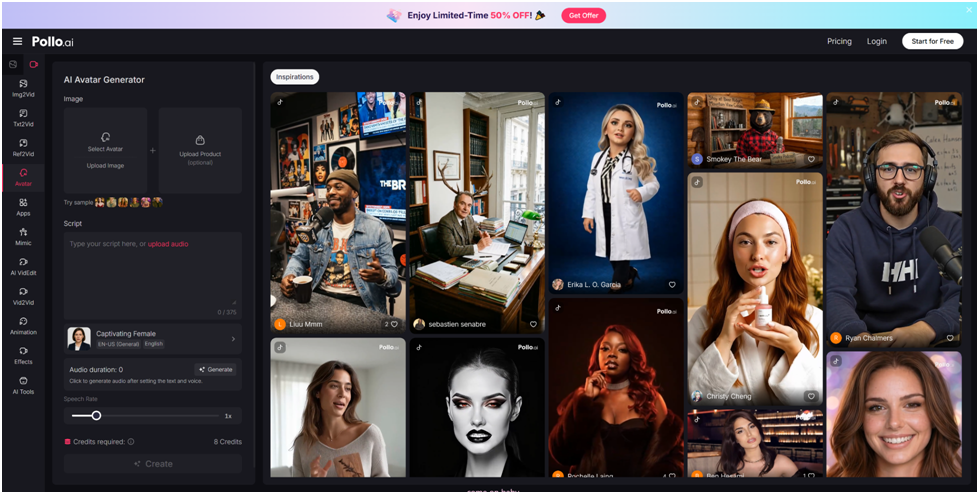
Step 3: Create Your Avatar Identity
Design an avatar that aligns with your brand. Consider these elements:
● Appearance: Choose features that feel authentic to your content style
● Voice: Select a voice that matches your target audience’s expectations
● Background: Pick settings that complement your niche
● Clothing and accessories: Maintain consistency across videos
Your avatar becomes your channel’s face, so invest time in getting it right.
Step 4: Write Engaging Scripts
Strong scripts are essential for faceless channels. Your avatar delivers exactly what you write, so focus on conversational language, clear explanations, and engaging hooks. Keep sentences concise for natural-sounding delivery.

Structure your scripts with attention-grabbing introductions, valuable main content, and clear calls to action. Remember that viewers can’t see your facial expressions, so your words must carry the entire emotional weight.
Step 5: Produce and Edit Your Videos
Generate your avatar videos using your chosen platform. Most tools allow you to preview and adjust timing, expressions, and emphasis before final rendering.
Enhance your videos with additional elements like background music, text overlays, B-roll footage, and graphics. These additions make content more dynamic and professional.
Tips for Success
Build authenticity despite using an avatar. Engage with comments, develop a consistent personality, and share genuine insights. Viewers connect with valuable content regardless of whether a real face appears on screen.
Invest in audio quality. Clear, professional sound significantly impacts viewer retention. Poor audio drives viewers away faster than imperfect visuals.
Experiment with different avatar styles and presentation formats. Analyze your metrics to understand what resonates with your audience.
Conclusion
Creating a faceless YouTube channel with AI avatars opens doors for creators who prefer privacy or simply want a different approach to content creation. The technology has matured to the point where AI-generated presenters can effectively engage audiences and build loyal followings.
Start by exploring a free AI avatar generator to understand the possibilities. With consistent effort and quality content, your faceless channel can achieve the same success as traditional creator-led channels. The key lies in delivering value, maintaining consistency, and continuously improving your craft.
What's Your Reaction?